Interacting with object operation events
⚠️ Note
Sample codes are for demonstration purposes only. Before using in production, add proper error handling such as try-catch blocks, null checks, and input validation.
Overview
This sample shows how to support object operation events in the ShellUI module by registering event handlers in OnNewShellUI.
The sample implementation demonstrates checkout-related events:
CheckOutObjects(before operation)ObjectsCheckedOut(after operation)
You can apply the same pattern to other object operations supported by ShellUI Events.
Creating the application structure
Creating the application definition file
- XML
<?xml version="1.0" encoding="utf-8"?>
<application xmlns:xsi="http://www.w3.org/2001/XMLSchema-instance" xsi:noNamespaceSchemaLocation="http://www.m-files.com/schemas/appdef-client-v5.xsd">
    <guid>e5236c84-a251-4611-b1cf-12549a05c86a</guid>
    <name>UIExt2</name>
    <version>1.1.1</version>
    <description>Blocks document check out requests when in a controlled state</description>
    <publisher>M-Files Corporation</publisher>
    <copyright>Copyright M-Files Corporation</copyright>
    <enabled-by-default>true</enabled-by-default>
    <modules>
        <module environment="shellui">
            <file>main.js</file>
        </module>
    </modules>
</application>
Object operation event pattern
Use this pattern for each object operation event:
- Register the event in
OnNewShellUI. - Read event payload values.
- Run validation or business rules.
- Return a promise that resolves to
truewhen logic is satisfied, or reject/return an error object to block the operation with additional concern to the user.
Example: CheckOutObjects (before operation)
This example validates selected objects belongs to document type before checkout.
If validation fails, checkout is blocked and an error message is shown.
- js
function OnNewShellUI(shellUI) {

    // CheckOutObjects - Before checkout is requested
    shellUI.Events.Register(MFiles.Event.CheckOutObjects, function(objIds) {

        // Check each object being checked out - Blocks for objects other than documents.
        for (var i = 0; i < objIds.length; i++) {

            // Skip check if the object is not a document.
            if (objIds[i].type !== 0) {
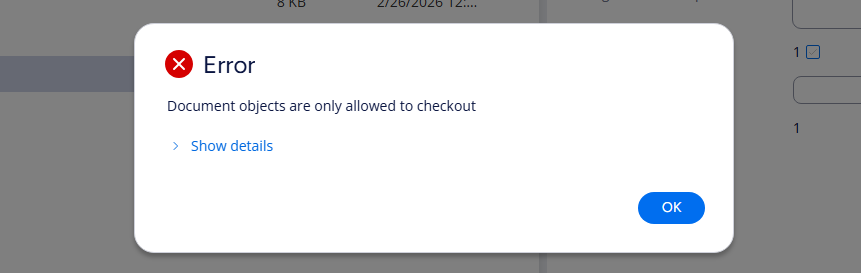
                return new Error( "Document objects are only allowed to checkout" );
            }
        }

        // All checks passed, allowing checkout
        return Promise.resolve(true);
    });

}
Rejecting the promise by returning an Error object with a user message displays a dialog like the image below.
Example: ObjectsCheckedOut (after operation)
This example runs after checkout succeeds.
It builds a user-facing summary and shows a confirmation message.
- js
function OnNewShellUI(shellUI) {

    // ObjectsCheckedOut - After checkout succeeded
    shellUI.Events.Register(MFiles.Event.ObjectsCheckedOut, function(checkedOutVersions, previousVersions) {

        // Build a message showing the checked out object versions
        var message = "Successfully checked out:\n";
        for (var i = 0; i < checkedOutVersions.length; i++) {
            var versionInfo = checkedOutVersions[i].object_version?.version_info;

            message += "\n- Title: " + (versionInfo?.title || "Unknown");
            message += ", Version: " + (versionInfo?.version?.internal_version || "?");
        }

        // Show message to user.
        shellUI.ShowMessage({
            caption: "Checkout Successful",
            message: message,
            icon: "info",
            button1_title: "Ok",
            defaultButton: 1,
            cancelButton: 1
        });
    });

}